Proposing a point (any internal user)
Anyone in the organization can suggest agenda points — editors decide what gets in. Two entries:
- Menu Meetings → Propose a point: choose the target series.
- Series form → Propose a point button (series pre-selected).
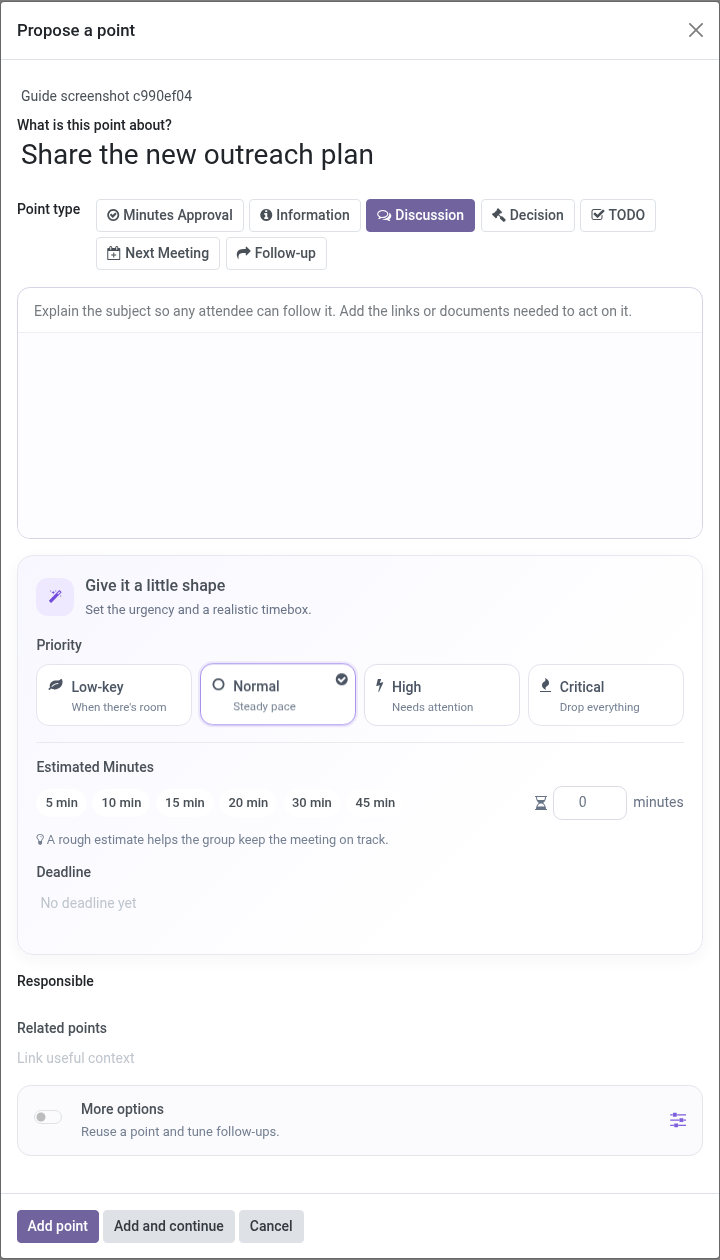
The proposal
- Series — where the point should be treated (visible only when coming from the menu).
- Title — one clear line: What is this point about?
- Point type — information, discussion, decision, TODO…
- Description — rich text: explain the subject so any attendee can follow it; add the links or documents needed to act on it.
- Planning — choose a priority (Low-key, Normal, High or Critical), use a minute preset or enter a custom estimate, and optionally set a deadline. The estimate starts from the series or company default.
- Responsible — the person presenting it (defaults to you). You can link related points in the main form.
- More options — reuse an existing point and adjust its follow-up rules.
Add point submits. The proposal becomes a point in state proposed.
Note: If your organization restricts proposals to specific groups and you are not a member, the wizard will refuse to save. See Authorized proposer groups.
What happens next
Editors see a Proposals to review alert on the series form (and in preparation) listing pending proposals with Accept / Reject:
- Accept — the point becomes a regular point of the series and can be added to meetings.
- Reject — dismissed with a response; the proposer sees the decision in the point’s chatter.
Proposers can follow their point’s journey: accepted points show up in meetings, each participation keeps its outcome, and approved minutes freeze it for history.
Reviewing proposals (editor)
The review list shows name, proposer and priority. Accept or reject one by one. Rejection is visible in the point’s history; nothing is deleted.