Series configuration (manager / editor)
A series holds the defaults and rules for recurring meetings. New meetings start from these choices; changing them later does not rewrite meetings already created.
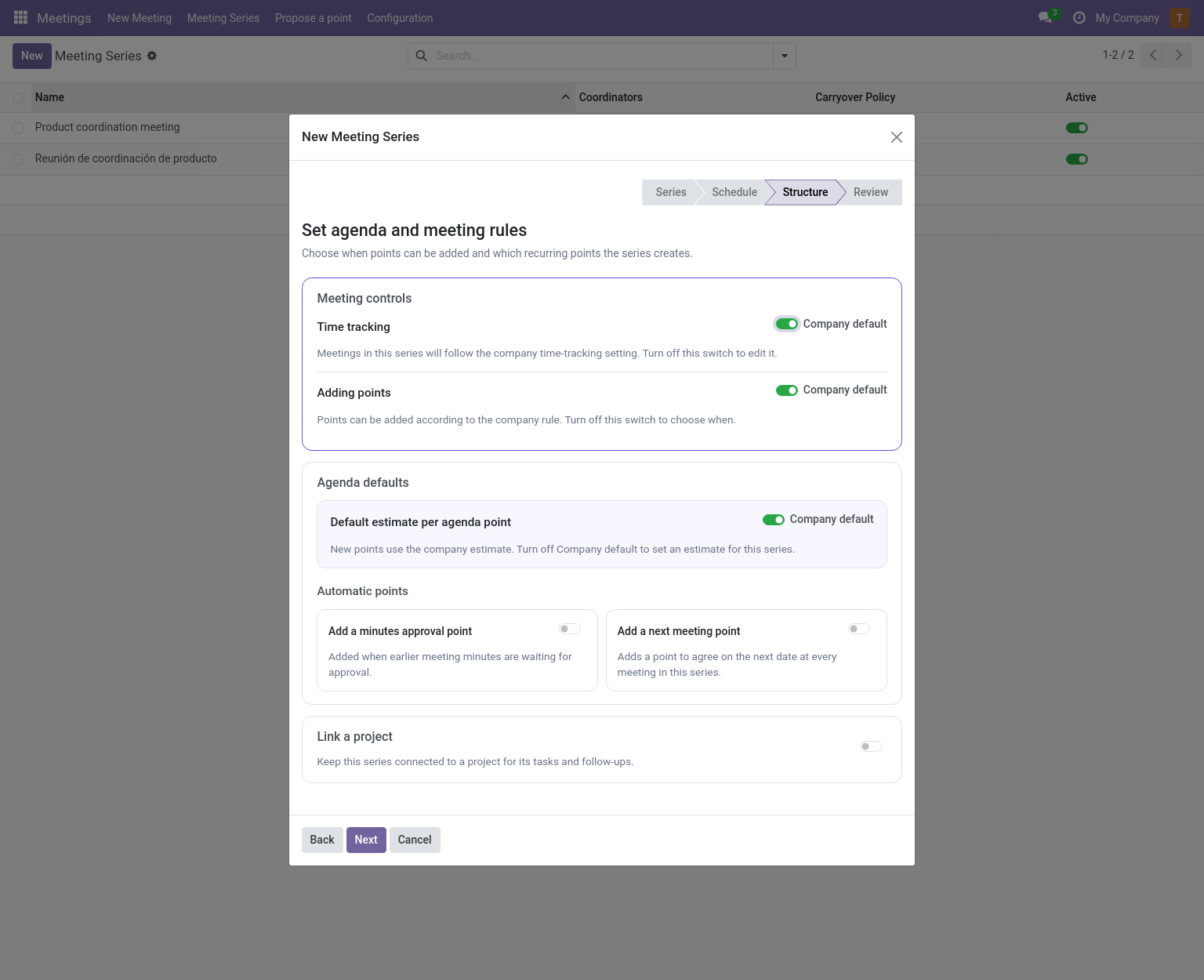
Location: Meetings → Meeting Series. The creation wizard (New in the series list) has four steps: series identity and unfinished points, meeting defaults, agenda and meeting rules, then review. Usual attendees are suggested for each meeting and can be changed there. The agenda step explains the time, point, and recurrence choices beside their controls.
In Structure, the company-default switches for time tracking, point policy and point estimates start on. Turn a switch off to choose a series-specific value. The Automatic points controls add minutes approval when minutes are pending and a next-meeting point to every meeting; both are optional and start off. Enabling the next-meeting point reveals the rule used to suggest its date. With the Project addon, project linking is also optional and starts off.
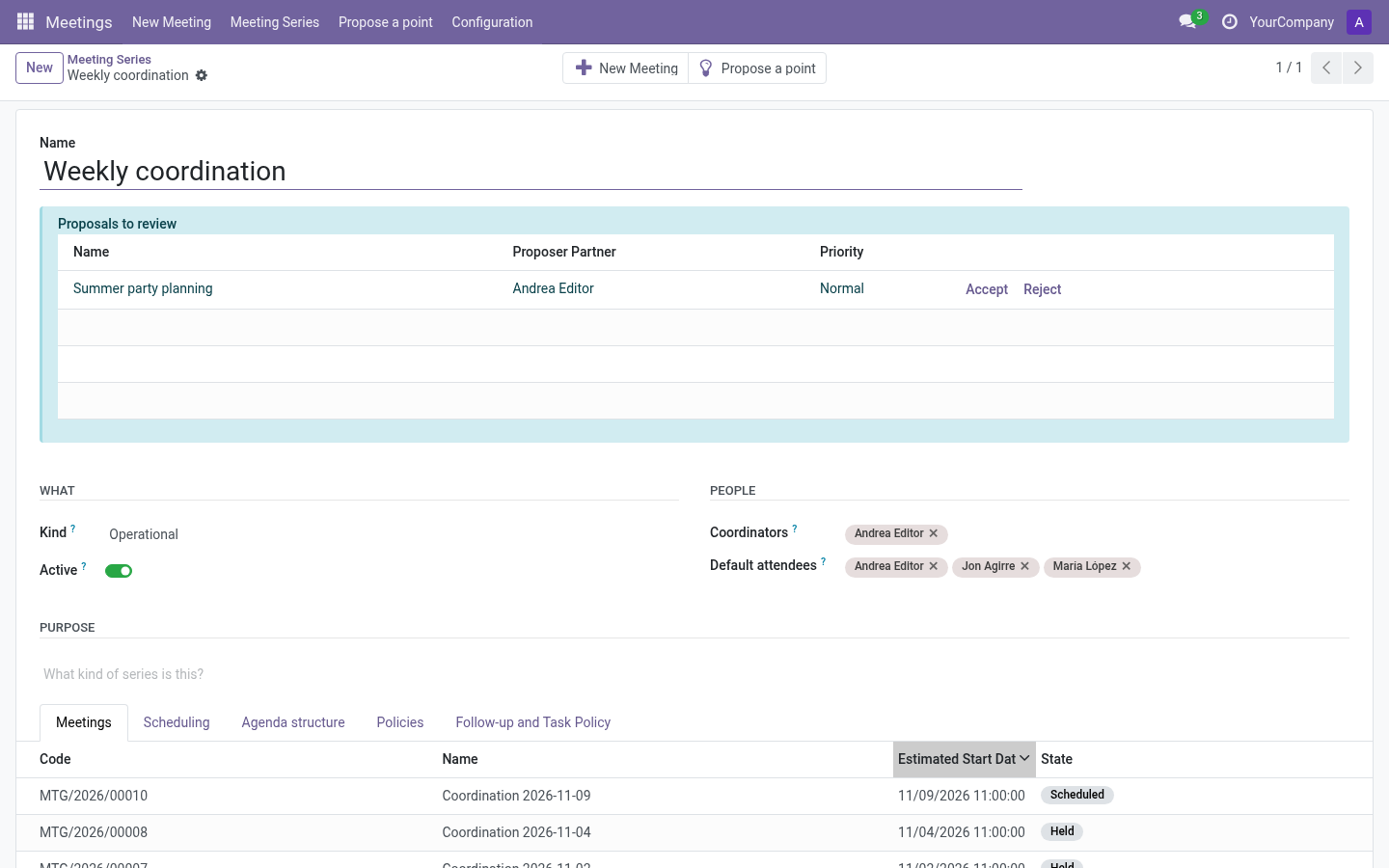
Header: What and People
| Field | Meaning |
|---|---|
| Kind | Type of meetings this series holds (from the Meeting Kinds catalog). |
| Company | Owner company (multi-company only). |
| Active | Archived series keep their meetings but disappear from lists and menus. |
| Coordinators | Users responsible for preparing the meetings of this series. |
| Default attendees | People invited to every new meeting; still changeable per meeting. |
Purpose
Free rich-text description, handy for newcomers. It is shown read-only on each meeting as Series description.
Scheduling
| Field | Meaning |
|---|---|
| Default duration | Planned length of each meeting. |
| Timezone | Used to propose the next meeting date unambiguously. |
| New meeting name pattern | E.g. {date} {series} → “2026-11-08 Community assembly”. Tokens: {date}, {series}. |
Agenda structure
| Field | Meaning |
|---|---|
| Minutes approval point | Adds a first agenda point to approve previous minutes. Only appears when there are pending actas. Reserve: 5 minutes per pending acta. |
| Next meeting point | Adds a last agenda point to set the next date. Reserves 5 minutes. |
| Next meeting default | Rule to pre-fill that date: next weekday (always Tuesday), day of month, or after N days. |
Policies
This tab decides how the series behaves. Time tracking and adding-points rules can use Company default; the unfinished-points rule is chosen explicitly.
Unfinished points (carryover policy)
| Value | Behavior |
|---|---|
| Review (default) | Unfinished points are offered to the next meeting; an editor accepts or discards each one. |
| Automatic | Unfinished points continue into the next meeting without asking. |
| Manual | Nobody offers anything automatically; someone moves each point explicitly (Move to another meeting). |
Time tracking
| Value | Behavior |
|---|---|
| Company default | Whatever Settings say. The effective company value is shown inline. |
| On | Timers and actual durations for this series’ meetings. |
| Off | No start/pause timers: the live meeting is editable from the start; only the finish is recorded. |
Adding points
| Value | Behavior |
|---|---|
| Company default | Follows Settings → Adding points. |
| Draft only | Points only while preparing the meeting. |
| Before it starts | Also once scheduled, until it begins. |
| While it runs | Also while the meeting is in progress, until it finishes. |
Point estimates
| Field | Meaning |
|---|---|
| Default point estimate (minutes) | Pre-filled estimate for new points of this series. In the creation wizard, Company default is on initially; turn it off to set a series-specific estimate. A value of zero on the series form uses the company estimate. |
Minutes-approval and next-meeting structural points ignore this value: they reserve 5 minutes each (5 per pending acta for approvals).
Role names
Optional overrides of the coordination/secretary labels for this series only.
Follow-ups
| Field | Meaning |
|---|---|
| Allowed follow-up types | Types new points of this series may use. |
| Default follow-up type | Pre-selected type. |
| Default activity type | For follow-ups recorded as Odoo activities. |
With the Project addon, the wizard’s Structure step also lets you link the new series to an existing project or create a project for it. A Follow-up and Task Policy page is added to the series form — see Project.
Buttons and proposals
- New Meeting — opens the meeting creation wizard pre-loaded with this series.
- Propose a point — opens the proposal wizard targeted at this series.
- The Proposals to review alert (editors only) appears under the title when there are pending proposals, with Accept/Reject buttons — see Propose a point.
Meetings tab
Read-only list of this series’ meetings, newest first, with state badges. Open one to work on it.