The live meeting (editor)
The live meeting screen is a full-page workspace designed to be projected during the meeting while taking notes at the same time. Open it from any scheduled/held meeting: the ▶ button on the list or Open Live Meeting on the form.
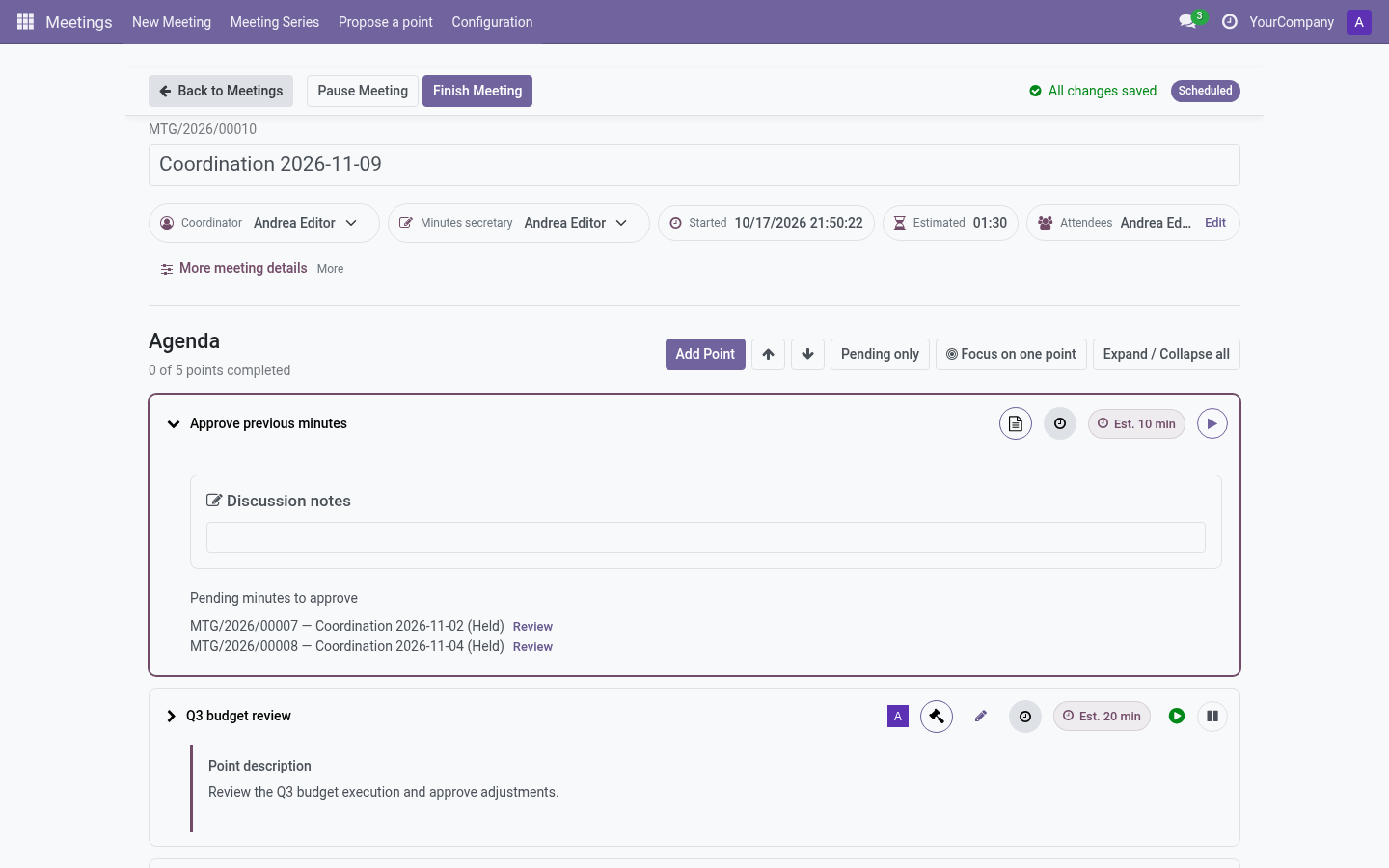
Topbar
- Back to Meetings — safe exit (warns about unsaved edits).
- Workflow buttons — depend on state and policy:
- Start Meeting / Pause Meeting / Resume Meeting — only with time tracking on.
- Finish Meeting — ends the meeting (with time tracking off it is available directly on a scheduled meeting; a confirmation dialog protects the retroactive Record as Already Held path).
- Prepare Minutes — once held.
- Approve Minutes — approvers, once minutes are drafted.
- Save status — Saving… / All changes saved / Changes pending: everything auto-saves as you type; the indicator tells you when it is safe to leave.
- State badge — current meeting state (Scheduled / In progress / …).
Header
Name (inline editable), estimated vs actual start/end/duration (only with time tracking on), coordinator and secretary (inline editable), location, meeting link and attendees — with an Edit attendees search dialog.
Points to continue
If this meeting inherits carried points (policy Review), an alert box lists them with Accept / Dismiss before the agenda.
Agenda cards
Each point is a card: title, presenter avatar, priority flag, type badge, outcome badge and — with time tracking on — its timer controls (Begin/Pause point, Point in progress / paused).
Tools above the list: Add Point (subject to the adding-points policy), previous/next arrows, Pending only filter, Expand/Collapse all.
Running a point
- Begin point (time tracking on) — opens the point for editing and starts its timer; starting a new point pauses the previous one automatically.
- Discussion notes — rich text, auto-saved. With timers on, notes are editable only while this point’s timer is running (or after the meeting, while drafting minutes). Without timers, always editable until the meeting finishes.
- Record outcomes: - Information — mark Done. - Discussion — Done when resolved, or Postpone. - Decision — record an Agreement with approved/rejected result; the point completes only with an agreement. Agreements can be withdrawn. - TODO — add an assigned follow-up; the point cannot be resolved without it (see Follow-ups).
- Done button completes the point; Undo result reopens it (asked reason optional).
- Postpone — choose a quick reason (blocked by point/task/activity, lack of time, other…), an optional “blocked by” link, and either Leave postponed or Move to another meeting (carryover wizard). Postponed points are flagged Review at next meeting automatically.
Records inside a point
- Agreements — the decisions (title, body, result). Withdraw an agreement to make the decision pending again.
- Dissents — author, reason catalog, statement, include in minutes flag.
- Private editorial notes — editor-only scratchpad, never in the minutes.
- Follow-up tasks — assigned owners, due dates, status, convert between kinds, Several responsible people under advanced options.
- Related points / Origin / From follow-up — links to jump across points.
Special points
- Next meeting — a datetime field (series timezone shown) to set the next date.
- Minutes approval — lists previous actas pending approval with a Review shortcut, plus the history of already approved ones.
Point options
Point options → Edit point details opens the full point record; Reopen with a reason reverts a completed point.
After the meeting
Finish Meeting closes the actual times, pauses open point timers, flags unfinished points for review and promotes finished follow-ups into next-meeting points. Then you are ready to write the minutes → Minutes and approval.